Bio Link Creation System
Every Section is a Google Doc
Section တိုင်းကို Google Docs Embedded နဲ့ အစားထိုးထားသည်။ Checklist၊ Tutorial၊ Instruction၊ Branding၊ Colour Theory နှင့် Design Briefing — အားလုံးကို ဖတ်ရုံမဟုတ်ဘဲ ကိုယ်တိုင် ဖြည့်သွင်းနိုင်တဲ့ Document အဖြစ် ရရှိမည်။
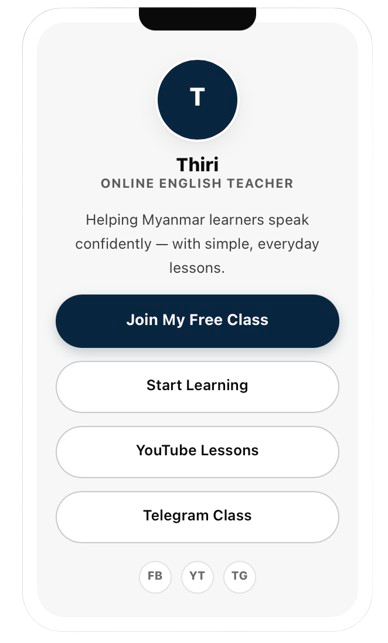
Doc အားလုံးကို Tabbed Viewer နဲ့ ကျစ်လစ်စွာ ဖတ်နိုင်သည်။ Live Phone Preview ဖြင့် လုပ်ငန်းရှင် ရဲ့ Bio Link ပုံစံကို ကြိုတင် မြင်နိုင်သည်။
Strategy + Content + Brand + Design + AI + Setup + Growth + Coaching
- Profile + Bio — လုပ်ငန်းရှင် အကြောင်း အနှစ်ချုပ်
- Primary CTA — visitor ကို ဘာလုပ်စေချင်လဲ ရှင်းရှင်းလင်းလင်း
- Featured Video / Lesson — အကောင်းဆုံး content ကို ရှေ့တန်းတင်ပါ
- Social + Community — Telegram · Facebook · TikTok · YouTube တစ်နေရာတည်း
ဒီ System က ဘယ်သူအတွက်လဲ — ဘယ်လိုစမလဲ
Template မဟုတ်ဘဲ System တစ်ခုဖြစ်တာကြောင့် — ဘယ်သူအတွက်၊ ဘာလိုအပ်ပြီး၊ ဘယ်အဆင့်တွေ ဖြတ်သွားရမလဲကို အရင်ရှင်းထားပါတယ်။
✓ ဒီ System က ဒီသူတွေအတွက်
- Beginner Creator — ပထမဆုံး Bio Link စတင်လုပ်သူ
- YouTuber / TikToker — link အားလုံး တစ်နေရာတည်း စုချင်သူ
- Online Teacher — Class · Lesson · Community ကို ချိတ်ချင်သူ
- Freelancer / Coach — Service နဲ့ Contact ကို ရှင်းရှင်းလင်းလင်း ပြချင်သူ
- Small Personal Brand — Brand Identity ကို စနစ်တကျ တည်ဆောက်ချင်သူ
✕ ဒီ System က ဒီသူတွေအတွက် မဟုတ်
- Coding ကို အခြေခံကနေ သင်ယူလိုသူများ (ဒီ system က No-code)
- Custom Backend / Database / Login System လိုသူများ
- Content ကို ကိုယ်တိုင် ရေးလို့မရသူများ (Coaching လိုအပ်သည်)
- Domain · Hosting · Maintenance အားလုံး Managed Service အဖြစ် လိုသူများ
- E-commerce Cart / Payment Gateway အပြည့်အစုံ လိုသူများ
Before You Start
ဒီအချက်တွေ အဆင်သင့်ရှိထားရင် — ၂ နာရီအတွင်း Publish လုပ်နိုင်ပါတယ်။
- Google Account (အခမဲ့)
- Profile Photo (square · 500×500+)
- Short Bio (၂–၃ ကြောင်း)
- Social Links (YouTube · Telegram · FB · TikTok)
- Primary CTA — ဘာလုပ်စေချင်လဲ
- Brand Colours (ရှိရင် ရှိ၊ မရှိရင် Doc 03 မှာ ရွေး)
- Domain (မရှိလည်း ရ — Free subdomain သုံးနိုင်)
- မိနစ် ၃၀ စိတ်ရှည်မှု ☺
User Journey — ၈ အဆင့်
ပထမဆုံး Publish အထိ ခန့်မှန်းချိန် — ~၂ နာရီ။
Start Here
5 minFill Content
30 minBuild Brand
20 minCustomize
25 minPreview
5 minTest
10 minPublish
15 minGrow
ongoingDocs ၈ ခု ဖြည့်ပြီးရင် ဘာရမလဲ
Feature စာရင်း မဟုတ်ဘဲ — သင့်လက်ထဲ ရောက်လာမယ့် Output တွေ။
- လုပ်ငန်းရှင် Bio — Identity အနှစ်ချုပ်
- လုပ်ငန်းရှင် Primary CTA — visitor လုပ်ရမယ့် အလုပ်
- လုပ်ငန်းရှင် Link Structure — Social · Content · Community
- လုပ်ငန်းရှင် Brand Colours — 60-30-10 · Hex ၃ မျိုး
- လုပ်ငန်းရှင် Typography — Heading · Body
- လုပ်ငန်းရှင် Content Prompts — AI-assisted Library
- လုပ်ငန်းရှင် Published Bio Link — live URL
- လုပ်ငန်းရှင် Growth Plan — Month 1 → 6 Roadmap
ဒီ ၈ ခုလုံး ရပြီဆိုရင် — လုပ်ငန်းရှင် Digital Home တစ်ခု တည်ဆောက်ပြီးသား ဖြစ်ပါပြီ။
Document ၈ ခု — Click မှ Load ဖြစ်မည်
Iframe များကို တစ်ပြိုင်နက် Load လုပ်ခြင်းမှ ရှောင်ရှားပြီး — Tab တစ်ခုကို Click လုပ်မှ Embed Load ဖြစ်သည့် Lazy-loading System အဖြစ် ဖွဲ့စည်းထားသည်။
01 · System Strategy
System တစ်ခုလုံး ဘယ်လိုအလုပ်လုပ်လဲ။ Doc တစ်ခုချင်းစီရဲ့ တာဝန်၊ ဘယ် Doc ကို အရင်ဖြည့်ရမလဲ။
Google Doc — 01
Click လုပ်ပါက Iframe Load ဖြစ်မည်။ Placeholder URL ကို လုပ်ငန်းရှင် Publish link နဲ့ အစားထိုးပါ။
02 · Content Checklist
Website အတွက် လိုအပ်တဲ့ Information အားလုံး — Profile · Teaching · Links · CTA · Contact။
Google Doc — 02
Click လုပ်ပါက Iframe Load ဖြစ်မည်။ Placeholder URL ကို လုပ်ငန်းရှင် Publish link နဲ့ အစားထိုးပါ။
03 · Brand Kit & Colour Theory
60-30-10 Rule၊ Contrast၊ Colour Psychology နှင့် Typography — လုပ်ငန်းရှင် Brand Colour ကို စနစ်တကျ ရွေးပါ။
Google Doc — 03
Click လုပ်ပါက Iframe Load ဖြစ်မည်။ Placeholder URL ကို လုပ်ငန်းရှင် Publish link နဲ့ အစားထိုးပါ။
04 · Design Brief
Designer တစ်ယောက်ကို အပ်မယ်ဆိုရင် — ဒီ Doc ကို ဖြည့်ပြီး ပေးပါ။ ကိုယ်တိုင်လုပ်ရင်လည်း ဆုံးဖြတ်ချက် စာရွက်။
Google Doc — 04
Click လုပ်ပါက Iframe Load ဖြစ်မည်။ Placeholder URL ကို လုပ်ငန်းရှင် Publish link နဲ့ အစားထိုးပါ။
05 · Prompt Library
Bio · CTA · Link Description · Teacher Version · Creator Version — အဆင်သင့် Prompt ၅ မျိုး။
Google Doc — 05
Click လုပ်ပါက Iframe Load ဖြစ်မည်။ Placeholder URL ကို လုပ်ငန်းရှင် Publish link နဲ့ အစားထိုးပါ။
06 · Setup & Deploy
အဆင့် ၁၀ ဆင့် Setup + QA Checklist — Publish မတင်ခင် စစ်ဆေးရန်။
Google Doc — 06
Click လုပ်ပါက Iframe Load ဖြစ်မည်။ Placeholder URL ကို လုပ်ငန်းရှင် Publish link နဲ့ အစားထိုးပါ။
07 · Growth Path
Month 1 → 6 — Bio Link ကို Creator / Teacher Business Hub အဖြစ် ချဲ့နည်း။
Google Doc — 07
Click လုပ်ပါက Iframe Load ဖြစ်မည်။ Placeholder URL ကို လုပ်ငန်းရှင် Publish link နဲ့ အစားထိုးပါ။
08 · Coaching & Download
Coaching Brief + Download Instruction — ကိုယ်တိုင်မလုပ်နိုင်ရင် ဖြည့်ရန်။ Package ရယူနည်း။
Google Doc — 08
Click လုပ်ပါက Iframe Load ဖြစ်မည်။ Placeholder URL ကို လုပ်ငန်းရှင် Publish link နဲ့ အစားထိုးပါ။
Template + Docs + Brand Kit ကို ရယူပါ
HTML Template၊ Tabbed Docs Viewer၊ Brand Kit၊ Colour Theory နှင့် Design Brief — အားလုံး တစ်နေရာတည်း။
100% Free — ကိုယ်တိုင် Customize လုပ်ပါ။ လိုအပ်မှသာ Coaching ယူပါ။
ဘာ Free လဲ · ဘာ မပါလဲ · ဘယ်လိုသုံးခွင့်ရှိလဲ
Expectation မလွဲအောင် — အတိအကျ ခွဲပြထားပါတယ်။
✓ Free Package မှာ ပါဝင်သည်
- HTML Bio Link Template (single file)
- Tabbed Docs Viewer (lazy-load)
- Google Docs ၈ ခု (editable)
- Brand Kit + Colour Theory
- Design Brief Template
- Prompt Library (AI-ready)
- Setup & Deploy Tutorial (10 steps)
- Growth Path Roadmap
✕ Free Package မှာ မပါဝင်သည်
- Custom Development / Coding ဝန်ဆောင်မှု
- Content Creation Service (Bio · Copy ရေးပေးခြင်း)
- Domain Registration + Fee
- Hosting Fee
- Ongoing Maintenance / Update
- Custom Branding / Logo Design
- Guaranteed Ranking / Traffic
ဒီအချက်တွေ လိုအပ်ရင် → Coaching Hub မှာ ရွေးနိုင်သည်။
License / Usage Rights
Template ကို ရယူပြီးရင် အောက်ပါအတိုင်း အသုံးပြုနိုင်ပါတယ်။
- ✓Personal Use — လုပ်ငန်းရှင် ကိုယ်ပိုင် Bio Link အတွက်
- ✓Commercial Use — လုပ်ငန်းရှင် Brand / Business အတွက်
- ✓Modify — Design · Content · Structure ပြင်နိုင်
- ✓Remove Branding — Thet credit ဖျက်နိုင်
- ✓Client Project — Client ၁ ဦးအတွက် ၁ Project
- ✕Redistribute — Original အဖြစ် ပြန်ဖြန့်ခြင်း
- ✕Resell — Modified version ကို ရောင်းချခြင်း
- ✕Claim Authorship — System ကို ကိုယ်ရေးထားသလို ဆိုခြင်း
ကိုယ်တိုင် မလုပ်နိုင်သေးရင် — Coaching Hub
Template က Free။ ဒါပေမယ့် လုပ်ငန်းရှင် Brand၊ Content နှင့် Setup ကို အတူတူ လုပ်ပေးမယ့် Coaching လိုအပ်ရင် — အောက်ပါအဆင့်တွေထဲက ရွေးပါ။
Brand Setup
Color · Font · Visual Identity ကို အတူတူ ချိန်ညှပေးမယ်။
Content Writing
Bio · CTA · Link Strategy ကို အတူတူ ရေးပေးမယ်။
Technical Setup
Domain · Hosting · Publish အထိ လမ်းညွှန်ပေးမယ်။
Growth Strategy
Bio Link ကို Business Hub အဖြစ် ချဲ့ဖို့ လမ်းညွှန်ပေးမယ်။
မှတ်ချက်: Coaching က မဖြစ်မနေ မလိုအပ်ပါ။ Template + Tutorial နဲ့ ကိုယ်တိုင် လုပ်နိုင်ရင် — အဲဒါက အကောင်းဆုံး။
အဆင်မပြေရင် — အမြန်စစ်ရန်
အဖြစ်များတဲ့ ပြဿနာ ၆ ခုနဲ့ ဖြေရှင်းနည်း။
Google Doc မပေါ်ရင်
Doc ကို File → Share → Publish to web လုပ်ပြီးလား စစ်ပါ။ Embed URL ထဲ /pub ပါရမည်။
Embed URL မမှန်ရင်
Share link ထဲက /edit ကို /preview နဲ့ အစားထိုးပါ။ Doc ID ကို မဖျက်ပါနဲ့။
“Make a Copy” မလုပ်နိုင်ရင်
Google Account ဝင်ထားပြီးလား စစ်ပါ။ Doc owner က view-only permission ပေးထားရမည်။
Mobile မှာ iframe မပေါ်ရင်
Browser update လုပ်ပါ။ Some browsers က 3rd-party iframe ကို block လုပ်တတ်သည် — settings မှာ allow လုပ်ပါ။
Download မရရင်
Popup blocker ကို ပိတ်ပါ။ Mobile ဖြစ်ရင် Desktop browser နဲ့ ပြန်စမ်းပါ။
Published page မ update ဖြစ်ရင်
Hard refresh လုပ်ပါ — Ctrl+Shift+R (Win) သို့မဟုတ် Cmd+Shift+R (Mac)။ CDN cache 5–10 min ကြာနိုင်သည်။
အမေးများတဲ့ မေးခွန်းများ
Bio Link ဆိုတာဘာလဲ?
Coding သိဖို့လိုသလား?
Google Account လိုသလား?
Free လား?
Coaching မယူဘဲ ကိုယ်တိုင်လုပ်လို့ရလား?
Domain မရှိလည်း ရလား?
နောက်ပိုင်း website အဖြစ် ချဲ့လို့ရလား?
Static Overview vs Docs-Driven System
ရိုးရိုး Template Overview File နှင့် ဒီ Docs-Driven System — ဘယ်လိုကွာခြားသလဲ။
Understand → Prepare → Customize → Create → Preview → Test → Publish → Grow
Docs-Driven Bio Link System · Built for the Prompt Era